Create a Custom Application
Track an application that the Cloud Secure Edge catalog does not cover, so it appears in App Discovery and can be used in policy
- Last validated: Oct 16, 2026
- 4 minutes to read
-
Contributors

Overview
App Discovery matches your users’ DNS requests against the CSE catalog. When your users reach something the catalog does not cover, create a custom application so that the usage is attributed rather than lost.
Two cases call for one. The application is specific to your organization, such as an internal tool on a domain you own. Or it is a public application that CSE does not yet track, and you need visibility now rather than when the catalog catches up.
A custom application behaves like a catalog application once you create it. It appears in the App Discovery table with a source of Custom, it collects an access log, and it is selectable in ITP policies and in Service Tunnel include and exclude lists.
Create a custom application
1. Go to Internet Access > App Discovery, and select Create Custom App.
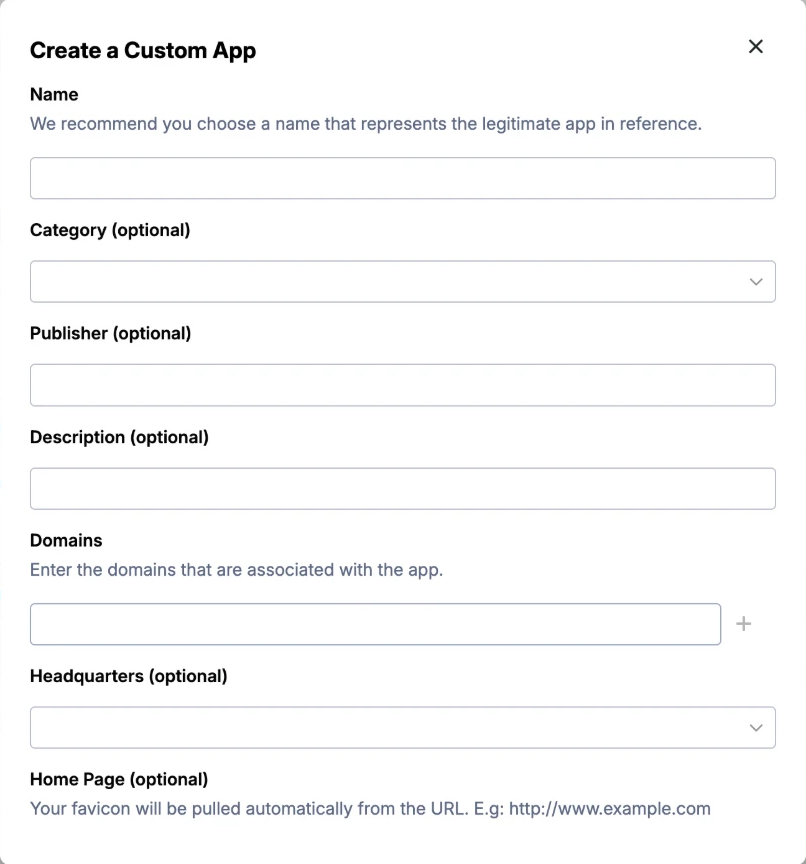
2. Enter a name.
3. Enter the domain or domains for the application. This field is required, and it is what does the work. Any DNS request to a domain you list is attributed to this application.
4. Optionally add a category, publisher, description, headquarters, and home page. These fields affect only how the application reads in the table and in filters. CSE pulls the application’s icon from the home page URL, so enter the full URL including the protocol, for example https://www.example.com.
5. Save.
The application appears in the table listing the domains you gave it. You can edit that list later.
To block, allow, or route the application, follow Add an application to a policy or Service Tunnel. To see who reaches it, open the application’s page and check its Access log.
Domain conflicts
You cannot claim a domain the catalog already covers. If you enter one, saving fails rather than creating a second application for the same domain.
If SonicWall later adds a domain you had already claimed, access to it can be attributed to both the catalog application and yours. The symptom is the same usage reported twice. Check whether a custom application you created is now covered by the catalog, and delete yours if it is.
What’s next
- App Discovery for the table, the filters, and what each device needs for collection
- Manage ITP Policies to allow, block, or bypass the application
- Publish a Service Tunnel to route it through CSE