Clientless Access Using Device Manager–Installed Certificates
Configure Cloud Secure Edge to trust device certificates issued by your enterprise CA and distributed by your device manager, so managed devices get zero trust access to hosted websites with no CSE app installed
- Last validated: Aug 3, 2026
- Overview
- How It Works
- Prerequisites
- Step 1: Gather Certificate Details from Your Enterprise CA
- Step 2: Configure CSE to Trust Your Enterprise CA
- Step 3: Distribute Device Certificates via Your Device Manager
- Step 4: Publish the Resource as a Hosted Website
- Step 5: Restrict Access to Registered Devices
- Step 6: Verify
- Troubleshooting
- Related Documentation
Overview
You can configure Cloud Secure Edge (CSE) to trust Device Certificates issued by your enterprise Certificate Authority (CA) and distributed by your organization’s Device Manager (MDM/UEM). Devices carrying such a certificate are treated as Registered Devices — without installing the CSE desktop or mobile app. Users on those devices access internal websites and SaaS applications directly in a web browser, and CSE validates the device certificate at authentication time.
Terminology. This page implements the scenario called Device Manager Integrated on the Connection Methods page. In the Command Center UI, the corresponding Device Manager Name value is Device Cert Only. All three names refer to the same capability.
Use this approach when:
- You want only managed (MDM-enrolled) devices to reach a resource, without deploying another agent.
- End users do not have administrator rights to install software.
- You need browser-based access to Hosted Websites with device identity assurance.
If you instead want to use your device manager to install the CSE app silently, that is a different (client-based) scenario — see the Zero Touch guides for Intune, Jamf Pro, Kandji, and JumpCloud.
How It Works
- Your enterprise CA issues a device certificate, and your device manager installs it into the device’s keychain (macOS) or certificate store (Windows/Linux) during enrollment.
- You configure CSE to trust that CA by uploading the Root CA certificate chain and the Common Name (CN) format used in the device certificates (Step 2 below).
- A user browses to the public URL of a CSE Hosted Website. CSE authenticates the user against your Identity Provider via OpenID Connect (OIDC).
- During authentication, CSE’s TrustProvider performs a Mutual-Auth TLS handshake with the browser. The browser presents the device certificate from the OS keychain/certificate store; TrustProvider validates it against the trusted Root CA and extracts the device identity.
- CSE evaluates the attached Web Policy (for example, a role restricted By Device Registration) and grants or denies access. No CSE software runs on the endpoint.
Prerequisites
- An enterprise CA and a device manager capable of distributing certificates to enrolled devices (Microsoft Intune, Jamf Pro, Workspace ONE UEM, Kandji, JumpCloud, or any MDM that supports certificate profiles).
- The complete Root CA certificate chain (including intermediates) that signs your device certificates, and the CN format used in those certificates. Both values can also be obtained from an already-managed device.
- An Access Tier or Connector deployed, and a registered domain for the Hosted Website frontend.
- End users present in your CSE directory (IdP integration configured). The CSE desktop or mobile app is not required on end-user devices — that is the point of this scenario.
- Device certificates must be installed with their private key in a location the browser can use for client (mutual) TLS: the login Keychain or System Keychain on macOS, the user or machine certificate store on Windows.
Step 1: Gather Certificate Details from Your Enterprise CA
- Obtain the complete certificate chain of the Root CA that signs your device certificates.
- Identify the exact format of the CN field in the issued device certificates (for example, whether it embeds the device serial number, UDID, or hostname, and in what pattern). CSE uses this format to associate a presented certificate with a device identity.
Step 2: Configure CSE to Trust Your Enterprise CA
- In the Command Center, navigate to Settings > CSE Client tab > Device Manager tab.
- Set Device Manager Name to
Device Cert Only. - Enter the Cert - Root CA certificate chain and the Cert - Common Name format from Step 1.
- Select Update Device Cert.
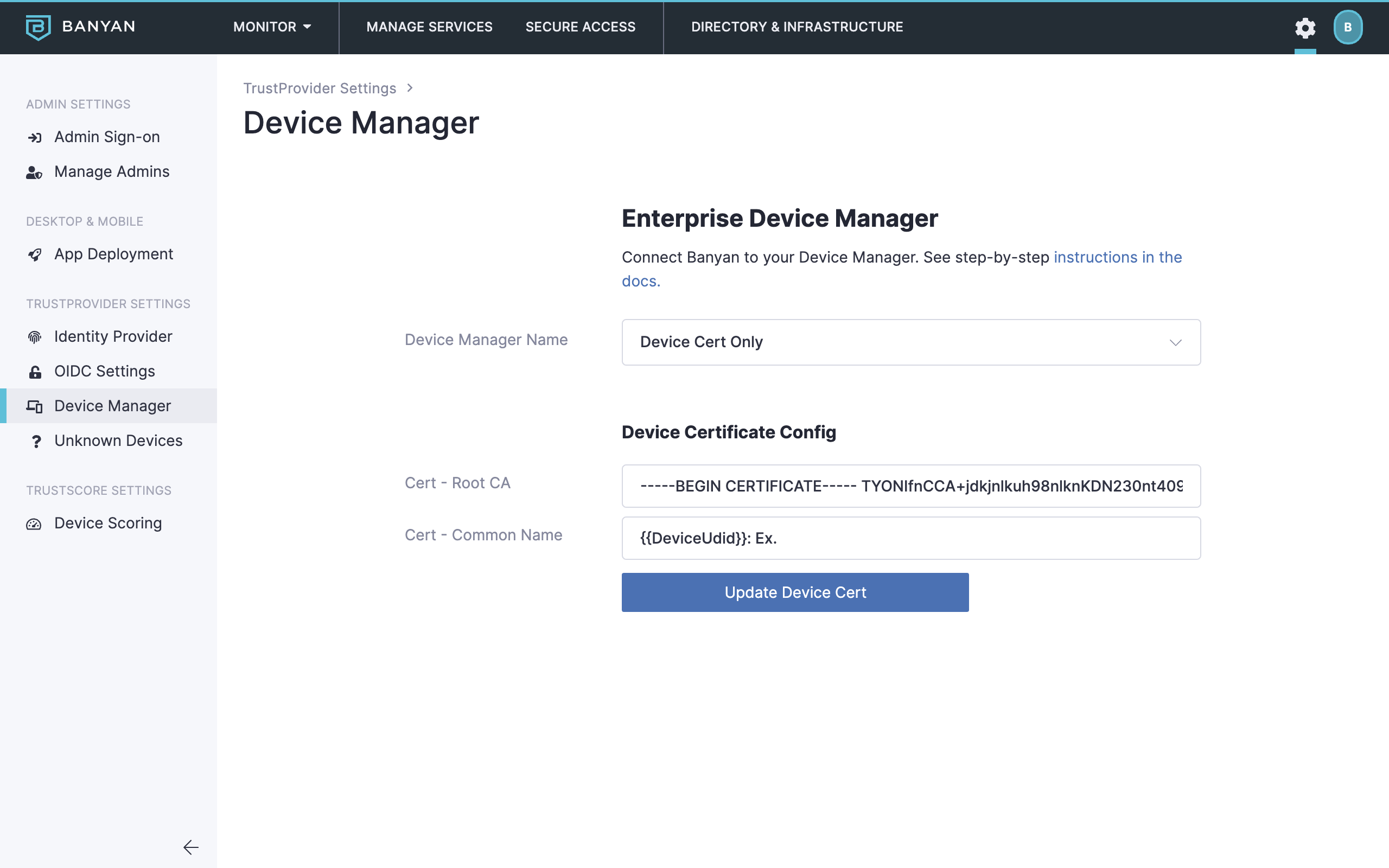
Cert Fields in Settings
Once saved, devices presenting a certificate that chains to this Root CA and matches the CN format are recognized as Registered Devices.
Step 3: Distribute Device Certificates via Your Device Manager
Certificate issuance itself is configured in your device manager’s console, not in CSE. CSE only needs the Root CA and CN format from Step 2. Ensure the profile you deploy meets these requirements:
- The issued certificate chains to the Root CA you configured in Step 2.
- The CN follows the format you configured in Step 2, consistently across all devices.
- The certificate and its private key land in a browser-accessible store (see Prerequisites).
Typical mechanisms per vendor (refer to your vendor’s documentation for the exact profile configuration):
- Microsoft Intune — SCEP or PKCS certificate profile.
- Jamf Pro — Configuration Profile with a SCEP or AD CS certificate payload.
- Workspace ONE UEM — Certificate profile via an integrated CA; see also Workspace ONE UEM – Device Identity & Enhanced Trust Scoring.
- Kandji / JumpCloud — Certificate deployment via their respective profile mechanisms.
MDM compliance (Workspace ONE UEM only) is the only trust signal in this scenario. Workspace ONE UEM is the only device manager with an API integration. For it, CSE can query the Workspace ONE Devices API for compliance status; a device marked Non-Compliant is set to a Trust Level of Always Deny, and this compliance check is the only trust-scoring-like signal available for cert-only devices. Configure it under Settings > CSE Client > Device Manager as described in the Workspace ONE UEM guide. All other device managers — Intune, Jamf Pro, Kandji, JumpCloud, and generic MDMs — operate in this scenario as device-cert-only: no API integration, and no trust signal beyond possession of a valid device certificate. Full trust-factor evaluation requires the CSE desktop app (see the warning in Step 4).
Step 4: Publish the Resource as a Hosted Website
First create the access policy, then register the website. For full field-level detail, see Publish a Hosted Website to Users.
- Navigate to Private Access > Access Policies, select + Create Policy, and choose the Web Policy template. Assign the role you will create in Step 5.
- Navigate to Private Access > Hosted Websites and select + Add Hosted Website. Configure:
- Service Name (and optional description)
- Private network — your Access Tier or Connector
- Backend — private hostname/IP and port
- Frontend domain and Public URL — for example,
jenkins.corp.example.com - Certificate — Let’s Encrypt (recommended; browser-trusted by default) or CSE PKI. See Use Let’s Encrypt Certificates.
- Attach the Web Policy and set the enforcement mode to Enforcing (use Permissive only while testing).
- Select Save & Validate, then use Test Connection in the service details to confirm domain resolution and backend reachability.
Do not rely on Trust Level for cert-only devices. Cert-only devices never run the CSE app, so they never call the device-features endpoint that feeds Trust Scoring. All app-reported trust factors are therefore unevaluated for these devices: if the device is mapped to a Trust Profile, CSE never receives device features, and the device can remain at the default Trust Level (High) indefinitely. A minimum-Trust-Level policy consequently does not block cert-only devices — it passes them at the default level and provides a false sense of posture enforcement. Gate this scenario on device registration (Step 5) and, for Workspace ONE UEM deployments, on MDM compliance via the API integration (Step 3), under which a Non-Compliant device becomes Always Deny. (Unregistered devices behave differently: they carry no device claims at all, so Trust-Level policies block them.)
Step 5: Restrict Access to Registered Devices
Control unregistered-device behavior at two levels (see Managed, Registered, and Unregistered Devices):
- Organization level — navigate to Settings > TrustProvider Settings > Unregistered Devices. Leave unregistered access disabled, or scope any allowance to specific source CIDRs. You can optionally return a 401 Unauthorized or a 302 Redirect to unregistered devices.
- Service level — navigate to Secure Access > Roles, select + Add Role, choose User Role, and add the role attribute By Device Registration. Reference this role in the Web Policy’s access group from Step 4 so only registered devices reach the service.
Step 6: Verify
- On a managed device that received a certificate in Step 3, browse to the Public URL. The browser may prompt you to select the device certificate, depending on OS and browser configuration. Complete IdP authentication; access should succeed.
- In the Command Center, confirm the device appears in the device inventory as a Registered Device with a recent last-login.
- Repeat from a device without the certificate. Access should be denied (blocked, 401, or redirect, per your Step 5 configuration).
Troubleshooting
- Browser never presents a certificate — the certificate or its private key is not in a browser-accessible store, or the private key is missing. Re-check the certificate profile’s target store/keychain and key exportability.
- Certificate presented but device not recognized — the CN in the issued certificate does not match the CN format configured in Step 2, or the chain is incomplete. Re-verify both values against a certificate exported from a managed device, and ensure intermediates are included in the uploaded chain.
- Access works in Permissive mode but fails in Enforcing — the role’s By Device Registration attribute or the policy’s access group does not match; inspect the policy evaluation for the device in the Command Center.
- Mobile or sandboxed browsers fail Mutual-Auth TLS — some mobile and sandboxed browsers cannot present client certificates. CSE’s fallback challenge-code flow requires the CSE app, which is absent in this scenario; test the browsers your users actually use before rollout.
- Device inventory shows a Trust Level of High that never changes — expected for cert-only devices. Without the app, no device features are ever submitted, so the trust level stays at its default. Use registration- and compliance-based controls instead (Steps 3 and 5).
- Access breaks after certificate renewal — renewal is handled by your device manager. CSE configuration is unaffected as long as the Root CA and CN format are unchanged; if you rotate the CA, repeat Step 2.
Related Documentation
- Connection Methods
- Device Manager Integration overview
- Managed, Registered, and Unregistered Devices
- Device Trust Verification
- Publish a Hosted Website to Users
- Use Let’s Encrypt Certificates
- Workspace ONE UEM – Device Identity & Enhanced Trust Scoring