Securing Networks with SonicWall Cloud Secure Edge (CSE)
Migrate from your legacy VPN to Service Tunnel, a modern cloud-first VPN as a Service (VPNaaS) built on WireGuard
- Last validated: Aug 3, 2026
- 3 minutes to read
-
Contributors


What a Service Tunnel is
A Service Tunnel is SonicWall Cloud Secure Edge (CSE)’s modern, cloud-first VPN as a Service (VPNaaS), built to replace a legacy VPN. It provides encrypted network connectivity to entire network segments, such as VLANs, VPCs, and subnets.
Why use a Service Tunnel
While Zero Trust security generally aims to replace full network access with access to specific corporate resources, some scenarios still require full network access.
You can publish Service Tunnels when you need to enable:
- Network and system administration, where users need complete access to the network
- Access to legacy applications that use multiple ports or unpredictable port numbers
- Access to latency-sensitive, real-time, UDP flow based applications such as IP telephony, media streaming, etc
How it works
CSE uses WireGuard to create fast, secure tunnels utilizing state-of-the-art cryptography. When a user connects through the desktop app, CSE evaluates the applicable security policy and, if access is granted, establishes an encrypted tunnel to the target network segment. As with the other service types, security policies are continuously enforced, locking down access based on user and device attributes and trust levels.
The flow diagram below describes how CSE’s zero-trust access control mechanism works for Service Tunnels. Review the Publish a Service Tunnel to Users guide to see how to create a Zero Trust policy for a service tunnel so a user can access the tunnel via the desktop app.
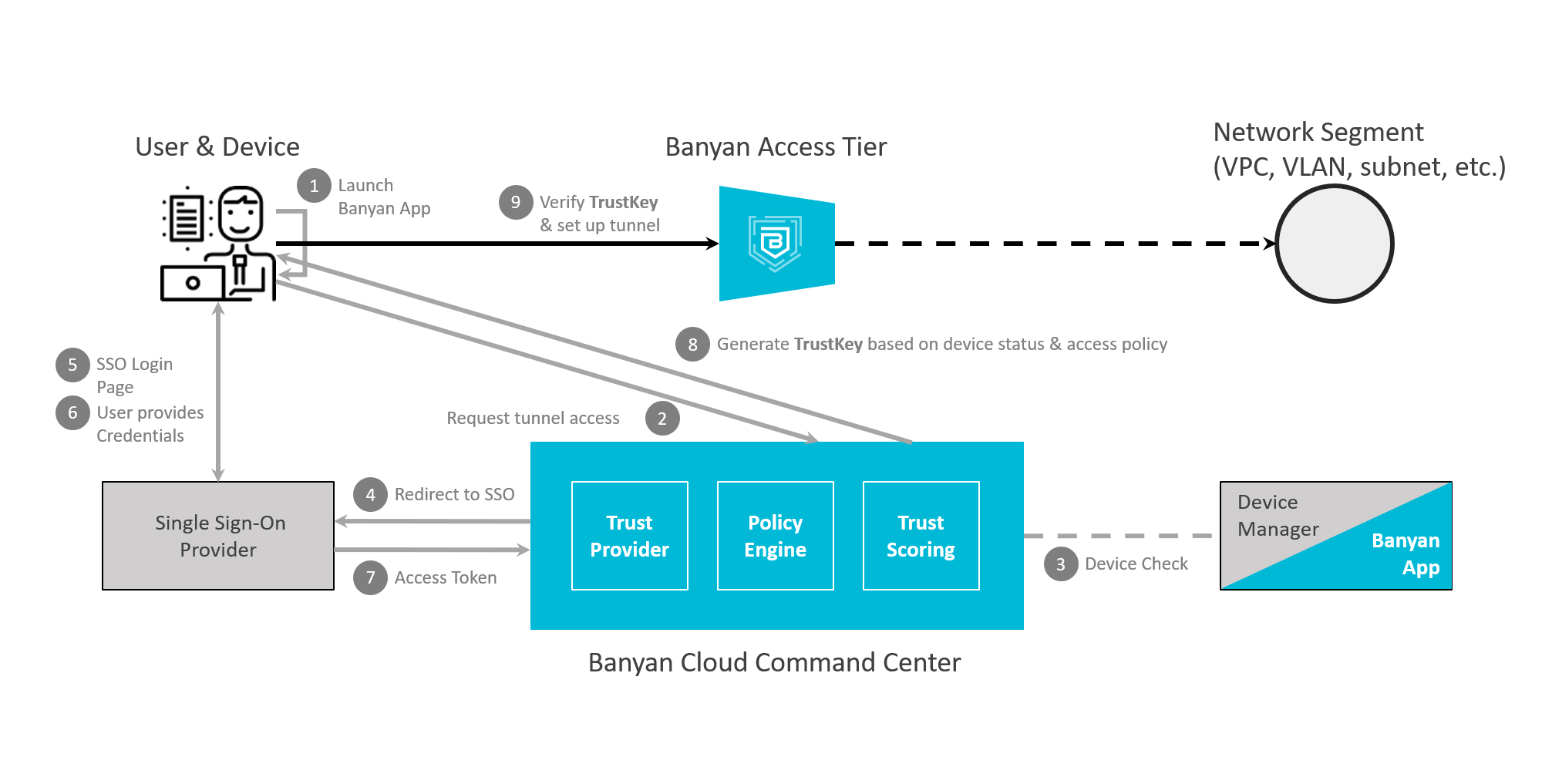
Flow Diagram - Service Tunnels
When to use this
Use a Service Tunnel when users require access to an entire network segment or to applications that cannot be reached through resource-specific access. When users only need access to individual corporate resources, prefer a resource-specific service type instead.
Tip: To publish a Service Tunnel and grant users access, see Publish a Service Tunnel to Users. To understand how traffic is directed once a tunnel is established, see how routing works.
What’s next
Read about how routing works in CSE to secure access to your networks.