Domain Resolution Failing on the Firewall Connector
Service Tunnel Troubleshooting
- Last validated: Oct 16, 2026
- 2 minutes to read
Overview
End users trying to access a domain for which they have already created a firewall rule are unable to reach the domain.
Symptoms
- For example, you can resolve
domain.combutsubdomain.domain.comdoes not resolve with the firewall Connector, or vice versa. - Resources are reachable by IP address over the Service Tunnel, but not by FQDN.
nslookuprun on the Connector host or the firewall resolves the name correctly, so the internal DNS server itself appears healthy.
Potential Root Cause
When a DNS entry (e.g.,domain.com) is configured for a firewall Connector, the firewall only matches the exact FQDN and not sub-domains beneath it. Therefore, when an end user looks up subdomain.domain.com, the DNS rules will bypass the internal DNS resolver and try to resolve it using a public DNS resolver, which fails.
Resolution Steps
-
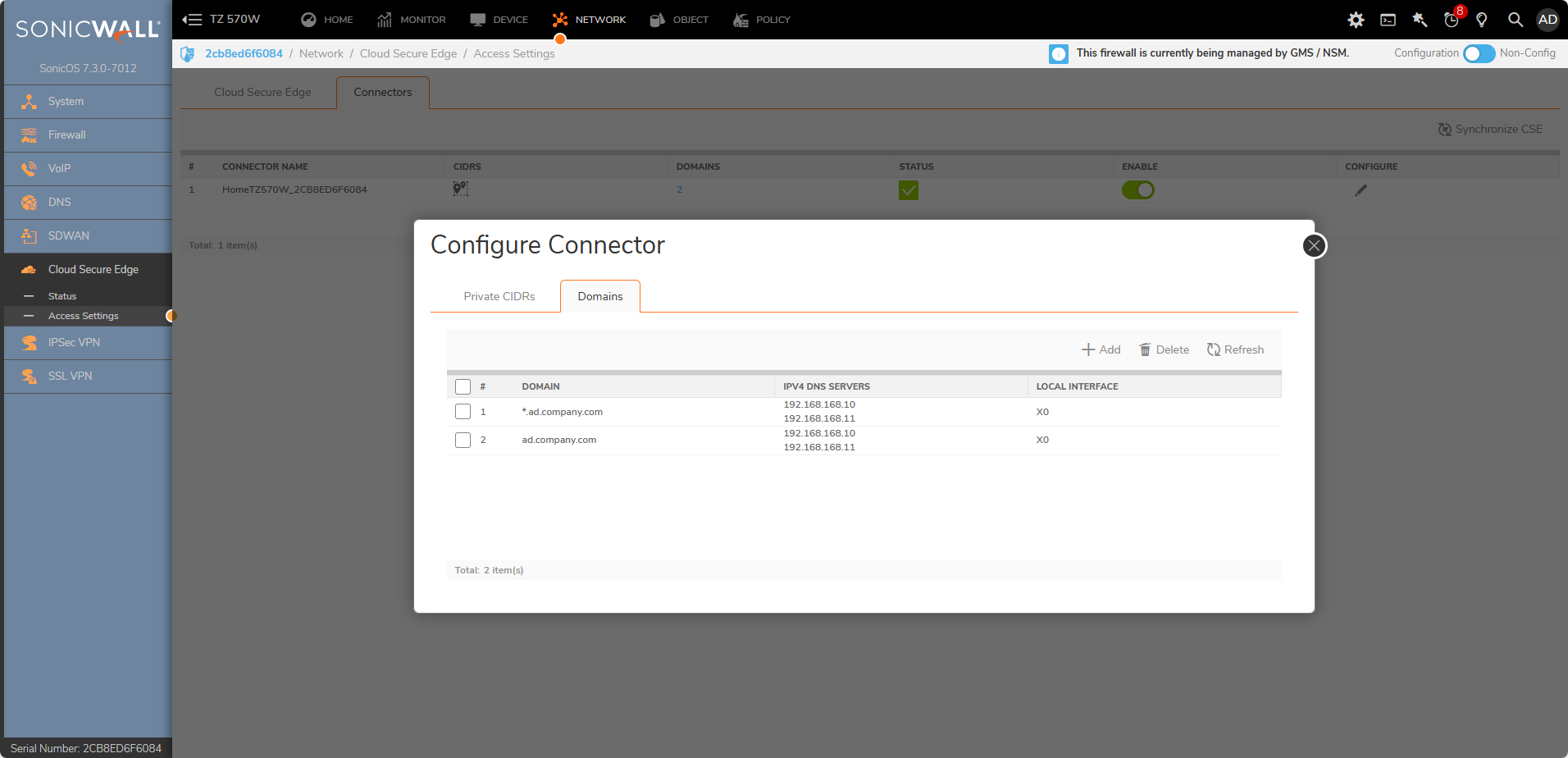
Navigate from Cloud Secure Edge > Access Settings > Network > Configure Connector.
-
In your firewall Connector configuration, select +Add and enter both the base domain (i.e.,
domain.com) and the wildcard domain (i.e.,*.domain.com).
Was this page helpful?
Thank you for your feedback.