Secure SaaS Applications with IdP Federation
Protect SaaS Applications by enabling Device Trust via IdP Federation
- Last validated: Aug 3, 2026
- Overview
- How it works
- Core concepts of the configuration
- CSE Federated and IdP Routed
- Per-identity-provider guides
Overview
This guide explains the IdP Federation approach to securing SaaS applications: CSE inserts a device-trust check into the SAML or OpenID Connect (OIDC) sign-on flow between your Identity Provider and the SaaS application. (Microsoft Entra ID federation requires SAML; OIDC is not supported for Entra.) CSE’s security mechanism is designed to be completely transparent to both the user and the SaaS application.
IdP Federation is one of the two independent techniques CSE offers for SaaS applications. It is the strongest control, validating device trust at sign-in across all applications behind your IdP. For a lighter, per-application option — including for applications not federated with an IdP — see IP Allowlisting instead; the two techniques can also be combined.
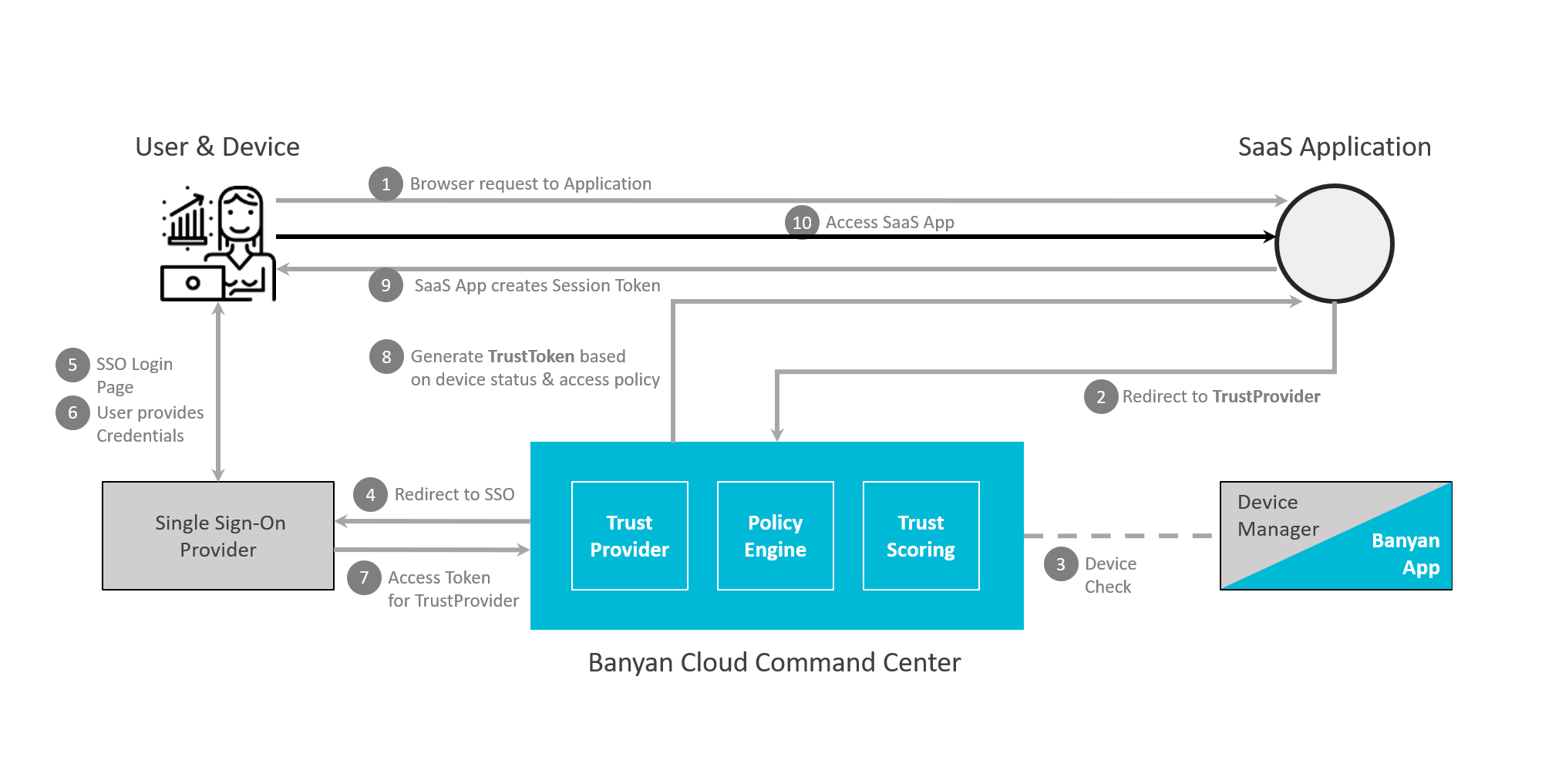
IDP Federated Access to SaaS Applications
Doc status: CSE-side steps were re-verified against the CSE console on 2026-07-14, and third-party console steps were updated against vendor documentation on the same date. The third-party IdP console steps follow the vendor’s own documentation and should be confirmed against the live admin console, which can change without notice.
How it works
In a normal single sign-on flow, your SaaS application sends the user to your Identity Provider, which checks the password and MFA and returns a sign-on token. The IdP verifies the user’s identity — but not the device.
With IdP Federation, your IdP is configured to route that authentication through CSE’s TrustProvider before completing sign-on. CSE validates device trust — the device is registered, presents a valid certificate, and meets the Trust Level your policy requires — and then federates back to the IdP, which finishes its own steps (such as MFA). This happens on every login and is transparent to both the user and the application.
Passwordless
When Passwordless is enabled, the trusted device certificate stands in for the password. Because the certificate carries the user’s identity, CSE identifies the user from the certificate presented during the device-trust check and issues a token without prompting for a username and password; your IdP still owns any MFA.
Its purpose in this flow is twofold:
- Phishing-resistant security — a hardware-bound device certificate replaces the password, removing the credential that phishing and account-takeover attacks target.
- Better experience — users on registered devices are not prompted for a password, which also reduces password-reset load on your helpdesk.
See Passwordless authentication for details.
Core concepts of the configuration
Underneath the vendor-specific screens, every federation setup does the same thing: it establishes a one-time trust between two parties — an identity source that authenticates the user and a relying party that accepts the result — so that at each login one side can vouch for the user to the other. No party ever stores the other’s passwords.
Configuring that trust is just a matter of exchanging a handful of values that answer four questions. The exact field names differ between SAML and OIDC, but the meaning is the same:
| What it answers | SAML value | OIDC value | What it accomplishes |
|---|---|---|---|
| Who is each party? | Entity ID / Issuer | Client ID, Issuer URL | Uniquely names each side so messages can be addressed and validated |
| Where is the user sent? | Sign-in (SSO) URL; ACS / Redirect URL | Authorization endpoint; Redirect (callback) URI | Wires up the redirect chain that hands the user between the two parties |
| How are messages trusted? | Signing certificate (X.509) | Client secret | Lets the receiver verify a message genuinely came from the trusted party and was not altered |
| Who is the user? | NameID (email format) | email claim |
The unique identifier for the user; it must resolve to the same person on both sides (usually the email, and case-sensitive) |
| What is known about the user? | Attribute mappings (email, name, groups) | Claims / scopes (email, profile, groups) | Carries identity details and group membership that policies act on |
What CSE adds. In a plain IdP-to-application federation, the identity source only proves who the user is. CSE inserts itself into this same standard exchange and, before it issues the assertion, evaluates device trust and zero-trust policy — the device is registered, presents a valid certificate, and meets the required Trust Level. The result is that the same SAML/OIDC trust now proves the device and policy, not just the user. The per-provider guides list the specific values to exchange for each Identity Provider.
CSE Federated and IdP Routed
Both techniques accomplish the same goal — inserting CSE’s device-trust check into the SAML/OIDC sign-on flow — and differ only in where the federation is configured: at the SaaS application (CSE Federated) or at your Identity Provider (IdP Routed).
IdP Federation can be implemented in two ways:
- CSE Federated
- In this technique, the SaaS application is configured for SAML/OIDC authentication using CSE’s TrustProvider component. Zero-trust policies can be defined for each individual SaaS application. For step-by-step instructions, see Publish a Federated SaaS App.
- IdP Routed
- In this technique, the SaaS application is configured for SAML/OIDC authentication using your Identity Provider, and your Identity Provider is configured to federate to CSE’s TrustProvider component. Zero Trust policies are defined for groups of SaaS applications via IdP Federation logic. Because this technique configures federation inside your IdP’s own console (Okta, Microsoft Entra ID, OneLogin, Duo, or Google Workspace), follow your IdP vendor’s documentation as the source of truth for those console steps; the per-vendor pages in the sections below cover the values CSE expects you to exchange.
As indicated in the diagram below, the two techniques accomplish the same policy-based access objective by using slightly different authentication flows.
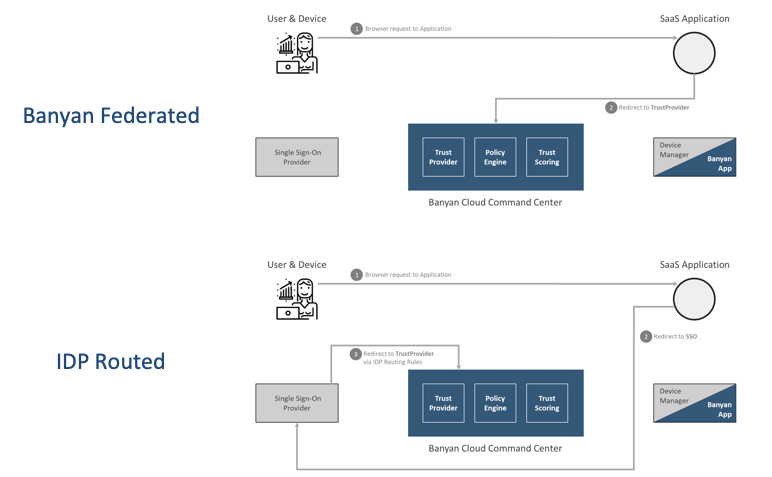
The table below lists a few key considerations to take into account when deploying each technique:
| CSE Federated |
IdP Routed | |
|---|---|---|
| Works with SaaS applications that use SAML | ||
| Works with SaaS applications that use OIDC | ||
| Granular policies per SaaS application | ||
| Passwordless authentication using device certificate | ||
| No change to SaaS application SSO configuration | ||
| Easy configuration for small number of SaaS applications (~10) | ||
| Easy configuration for large number of SaaS applications (10+) |
When to choose each
Both routes achieve the same device-trust outcome, so the choice comes down to scale, policy granularity, and how much you are willing to change.
Choose CSE Federated when:
- You need per-application policies — a different Trust Level or rule for each app.
- You are protecting a small number of applications (~10).
- You prefer not to change your IdP, or the IdP and the application owners are managed by different teams.
- You want a small blast radius — a misconfiguration affects only that one application, not everything behind the IdP.
- Your IdP cannot cleanly federate upstream to a third-party IdP.
Choose IdP Routed when:
- You are protecting many applications (10+) and want to avoid per-app setup.
- You do not want to change each application’s SSO configuration.
- You want passwordless authentication using the device certificate.
- Population-based policy (by organizational unit or group) is sufficient — you do not need per-application rules.
Plan for onboarding and lockout with IdP Routed. IdP Routed places device registration on the sign-in critical path: a user whose device is not yet registered with CSE fails the device-trust check for every application behind the IdP. Exempt onboarding populations and a break-glass administrator account from the federated path, and, where the vendor flow supports it, roll out with a Permissive-mode Web Policy before switching to Enforcing (Entra ID instead phases rollout with Staged Rollout) — the lockout-prevention steps in the per-vendor guides cover this for each Identity Provider.
Rule of thumb: few apps, per-app policies, or “do not touch the IdP” points to CSE Federated; many apps, passwordless, and minimal per-app work points to IdP Routed.
Per-identity-provider guides
The pages below give per-provider IdP-federation steps for the specific identity providers CSE supports. Each one applies the flow described above to that provider’s console. (For the CSE Federated walkthrough, see Publish a Federated SaaS App above.)