Securing Private Resources with SonicWall Cloud Secure Edge (CSE)
Protect your internal websites and infrastructure via CSE's Zero Trust Network Access (ZTNA) solution
- Last validated: Aug 24, 2026
- 5 minutes to read
-
Contributors


Overview
Published services in Cloud Secure Edge (CSE) allow for granular definition and assignment of access to private resources, in a least-privileged manner. In this approach, private resources are cloaked and “published” on the internet via public DNS. The published service is set up to route to CSE’s Edge for policy enforcement. This approach allows for seamless access by authorized users and devices, but it protects against access from non-authorized users.
CSE categorizes private resources into Hosted Websites and Infrastructure services. Each type of service uses a different state-of-the cryptographic technique to provide one-click connectivity combined with zero-trust security.
| CSE Service Type | Description of Corporate Resource | Cryptographic Technique |
|---|---|---|
| Hosted Websites | Web applications hosted on corporate servers, typically single-tenant | OIDC JWT token |
| Infrastructure | Linux servers, Windows servers, databases, etc. | MTLS & SSH certificates |
CSE uses OpenID Connect (OIDC) authentication flows to provide your end users secure zero-trust access to Hosted websites via web browsers. CSE uses Mutually Authenticated TLS (MTLS) flows to provide your end users secure zero-trust access to Infrastructure services. CSE’s security mechanisms are designed to be completely transparent to both the user and the service it is securing.
Why publish services
Traditional remote access typically exposes private resources through a network-wide VPN and relies on long-lived credentials such as passwords or SSH key-pairs, which can be shared or lost. Published services replace this model with per-resource, least-privileged access: resources are cloaked from the public internet and reached only through CSE’s Edge, where every request is authorized against the current user and device posture.
How it works
- A private resource is published on the internet via public DNS, which routes traffic to CSE’s Edge rather than exposing the resource directly.
- When an authorized user or device connects, the Edge enforces the applicable access policy.
- CSE transparently applies the appropriate cryptographic technique for the service type, an OIDC JWT token for Hosted Websites or MTLS and SSH certificates for Infrastructure services.
- Authorized traffic is passed through to the resource, while non-authorized access is blocked.
When to use each service type
- Choose Hosted Websites for browser-based access to internal web applications, including client-less BYOD and third-party access.
- Choose Infrastructure for access to servers, databases, and other resources over SSH, RDP, or TCP-based protocols.
Use Cases
You may use just one or all the types of services in your environment, depending on the use cases in your organization. Some common scenarios for each service type are listed below, along with the request flow diagram that explains how the Zero Trust security mechanism works.
Hosted Websites
Hosted Websites can be accessed by your end users directly from any browser without needing to turn on their VPN client, or any other type of agent. CSE leverages the OpenID Connect protocol and HTTP headers (typically cookies) to transparently insert a JWT token into every request. Client access is then integrated with your organization’s Single Sign On provider, and continuously authorized based on the security posture of the device and user.
Tip: For clientless, browser-based access to Hosted Websites, end users can install the CSE Chrome Extension. It requires no desktop app or agent, and because the extension registers as a device, it avoids the IP allowlisting that unregistered-device access requires.
You can publish Hosted Website services when you need to enable:
- Browser-based access to internal web applications
- Client-less BYOD and third-party access, where admins cannot mandate clients
- API access for integrations between collaboration software
- Developer access from HTTP-based CLI (Command Line Interface) tools
- Mobile workflows, where mobile VPNs degrade performance and battery life
- Modernization of legacy Web Access Management (WAM) solutions such as CA SiteMinder, Oracle Access Manager, etc
- Browser-based access to desktops (leveraging Apache Guacamole)
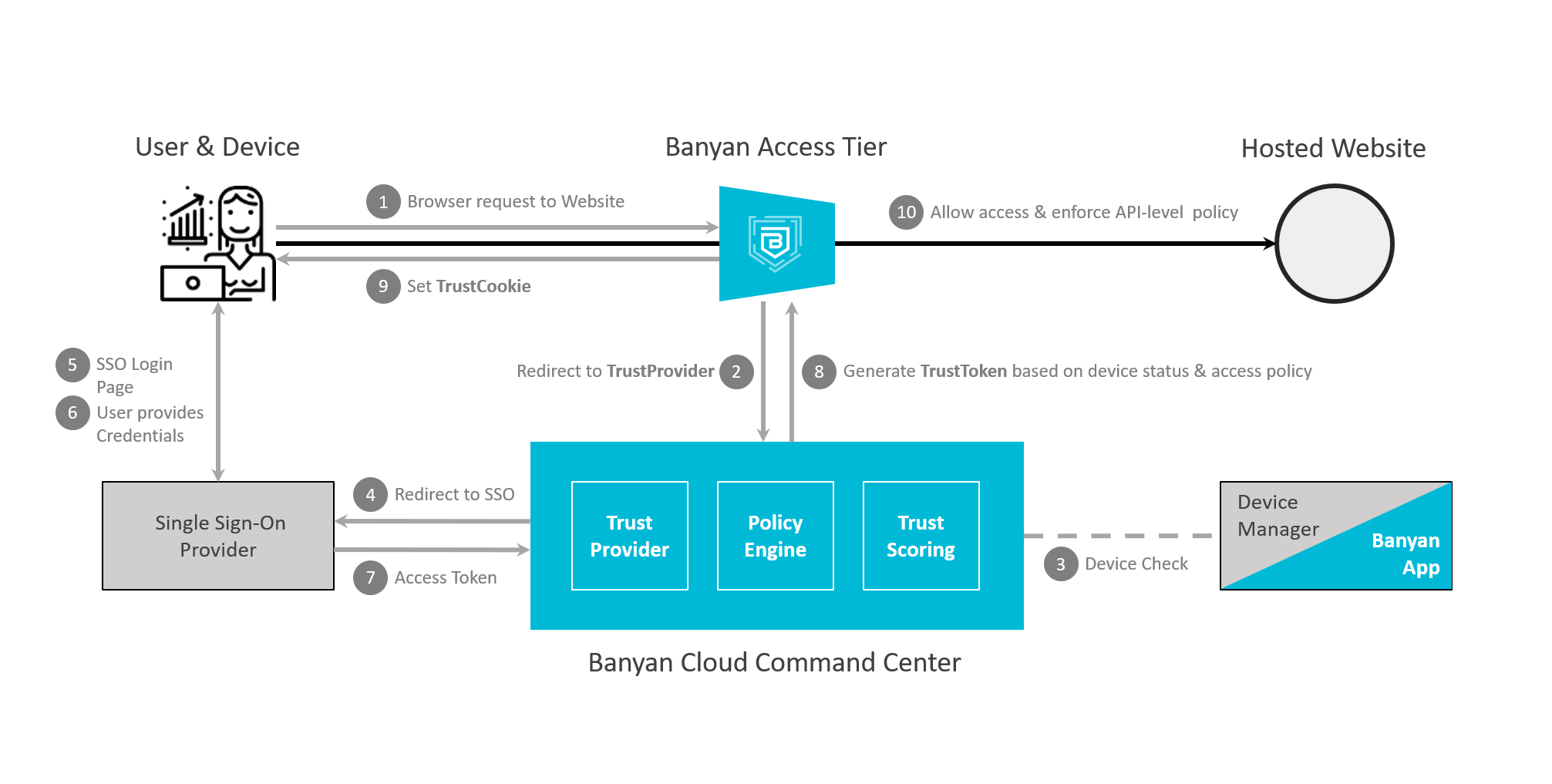
Flow Diagram - Hosted Websites
Infrastructure
Infrastructure services enable one-click, secure access to development and production environments. Traditionally, infrastructure access has relied on a combination of network access via a VPN and service-specific authentication protocols that use long-lived credentials such as passwords or SSH key-pairs. Long-lived credentials can be a security nightmare, given the ease with which they can be shared or lost. CSE transparently upgrades infrastructure service traffic to Mutual-Auth TLS using short-lived X509 certificates. Security policies can then be continuously enforced, locking down access to specific servers based on user and device attributes and trust levels.
You can publish Infrastructure services when you need to enable:
- Organized service catalog showing users all of the services they need to do their job
- Access to Linux machines using SSH
- Access to Kubernetes clusters using kubectl
- Access to Windows machines using RDP
- Access via TCP-based protocols to Databases, Remote Desktops, etc
- Developer access from TCP-based CLI (Command Line Interface) tools
- Modernization of bastion hosts
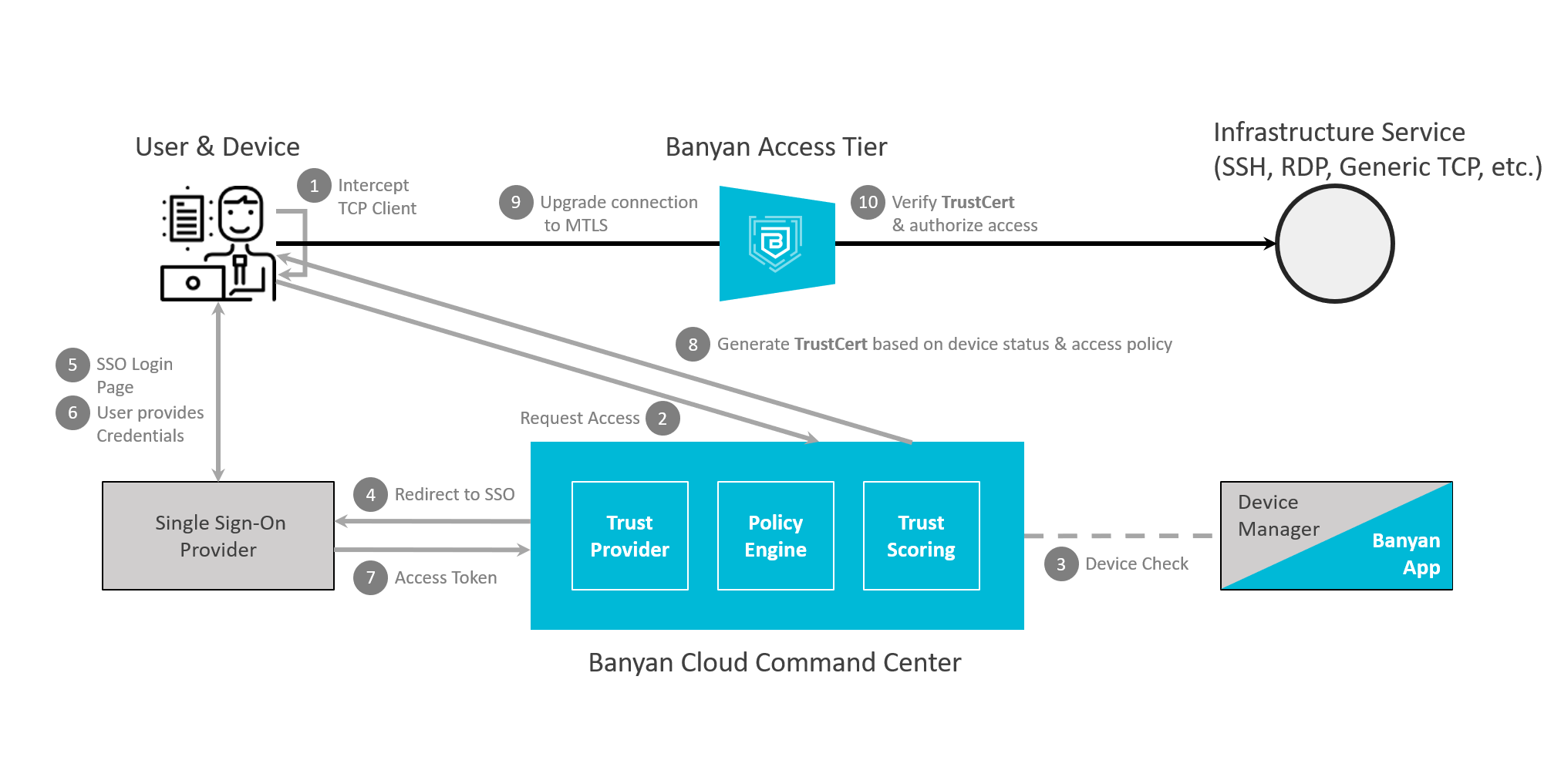
Flow Diagram - Infrastructure Services
What’s next
Read about how to register domains to publish services for secure access for your internal resources.