Modify the End User Device IP Range
Change the CIDR range Cloud Secure Edge assigns to devices on a Service Tunnel, so it does not collide with a range your network already uses
- Last validated: Oct 16, 2026
- 5 minutes to read
-
Contributors

- Overview
- Range requirements
- Change the end user device range
- Update references to the old range
- What’s next
Overview
When a device connects to a Service Tunnel, Cloud Secure Edge (CSE) assigns it an IP address from the end user device range. By default that range is 100.64.0.0/11, in the carrier-grade NAT (CG-NAT) address space. CG-NAT is reserved for carriers rather than private networks, so in most environments nothing else uses it. For the other ranges CSE assigns, see Tunnel CIDR Ranges.
Some environments do use it. A few organizations use CG-NAT space internally, and some devices connect through a service that uses it, such as Starlink. When the range CSE assigns overlaps a range the device already needs, the device cannot tell them apart and traffic to one of them fails. You can change the range to avoid the collision.
You can now change it from the Command Center, on both Global Edge and Private Edge. Previously this was possible only through the CSE API, and only for Private Edge.
This is a preview feature. Some guardrails on which ranges you can enter are not in place yet, so the restrictions below are yours to check rather than enforced by the console.
Range requirements
The range has to meet four conditions.
Nothing else in your environment uses it. Check your own networks and the networks your users connect through, including home and mobile connections. A range that collides with a user’s local network breaks that user’s access the same way the default range does.
It is no smaller than a /24, and larger than your device count. A /24 is the smallest range accepted, and a /8 the largest. You configure one range, and the console refuses a range with fewer usable addresses than you have registered devices. The console shows how many usable IP addresses your range provides.
It does not overlap the other ranges CSE assigns. CSE uses three more ranges for its own tunnels, and the end user device range has to stay clear of all of them. A device cannot route correctly when its address falls in a range that CSE also assigns to Access Tier and Connector tunnel interfaces. By default those ranges are:
100.120.0.0/16foraccess_tier_satellite100.100.0.0/16forsatellite100.110.0.0/16foraccess_tier_enduser_device
The default end user device range, 100.64.0.0/11, ends at 100.95.255.255, so it sits below all three. If SonicWall Support has changed any of them for your organization, check the current values under Settings > Configuration > Service Tunnel. See Tunnel CIDR Ranges.
It does not overlap 10.128.0.0. CSE runs on that network in Google Cloud. A range overlapping it breaks CSE, not just your traffic. The console does not block this yet, so check before you save. A guardrail is planned for a later release.
Change the end user device range
This interrupts every device on the Service Tunnel. Devices connected at the time have to reconnect before they are assigned an address from the new range. Make the change in a maintenance window.
1. In the Command Center, go to Settings > Configuration > Service Tunnel, and edit End User CIDR Range.
2. Enter the new CIDR range.
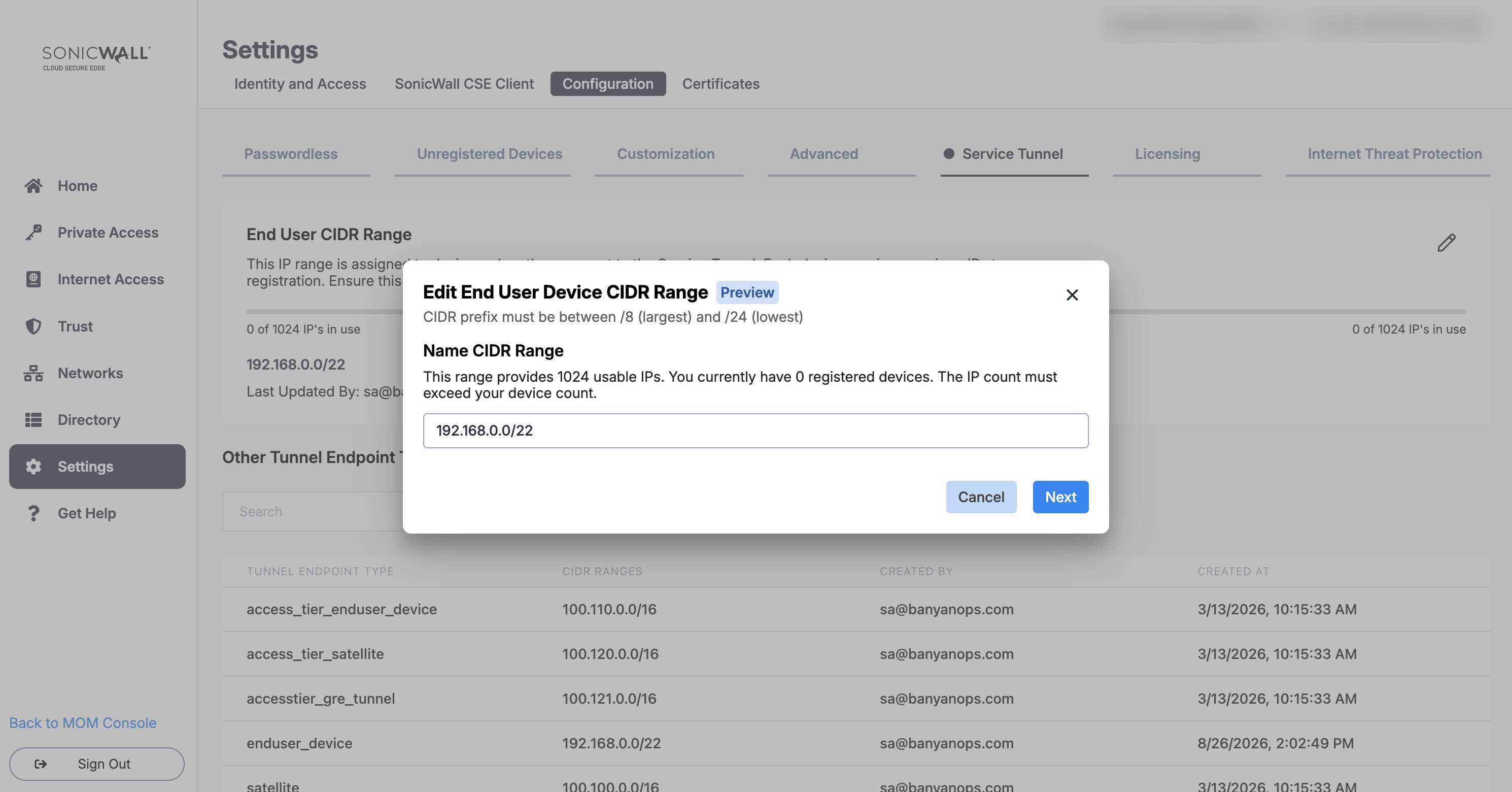
3. Compare the usable address count the console reports against your registered device count. The field shows both as a single figure, for example 0 of 512 IPs in use. If your registered devices outnumber the usable addresses, the console refuses the change and shows you both numbers. The registered device count comes from your devices list, so retiring devices you no longer use lowers it.
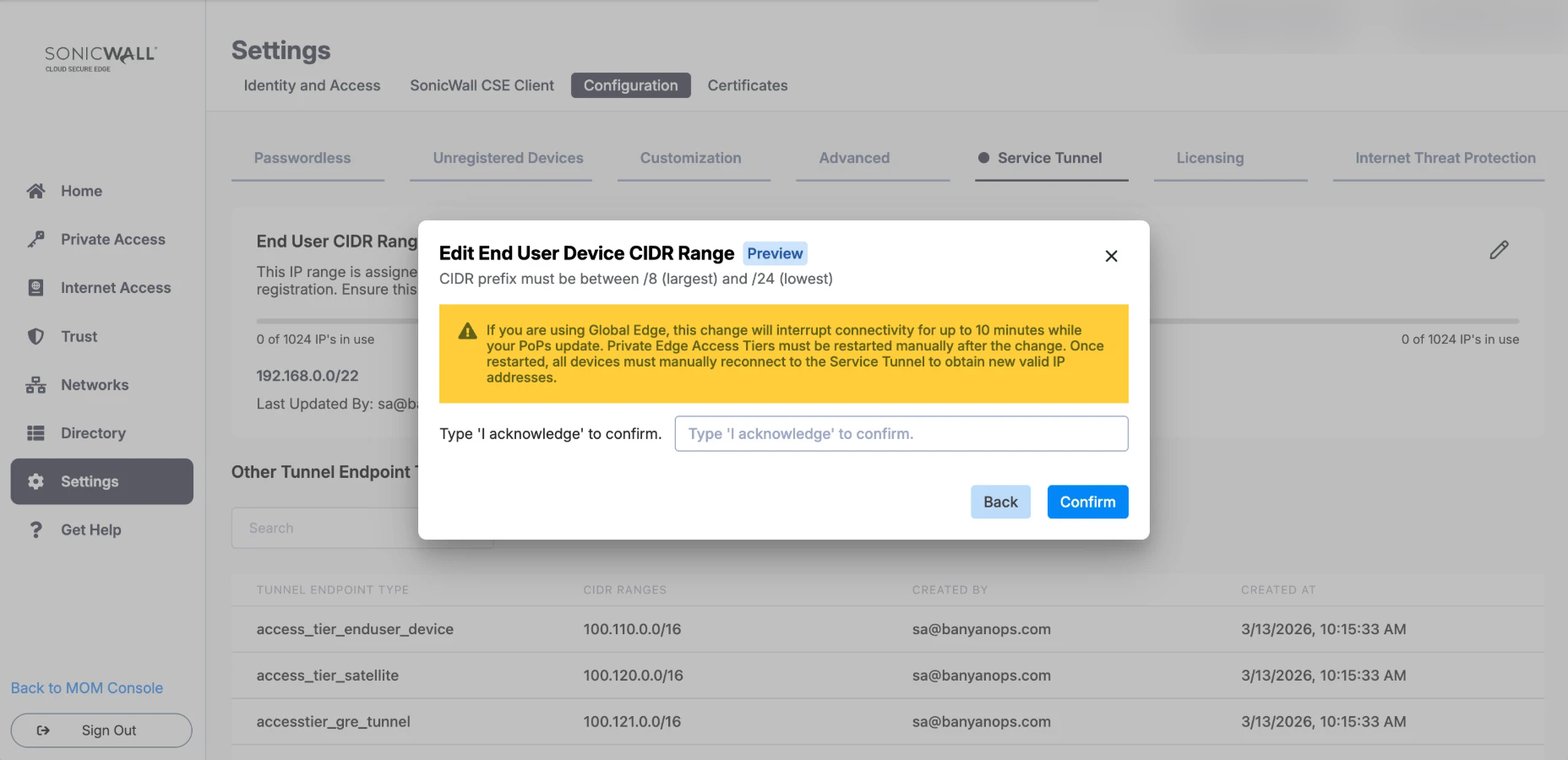
4. Select Next. The console warns you what the change interrupts and asks you to confirm it. Type I acknowledge in the confirmation field, and then select Confirm. To change the range you entered, select Back instead.
5. If you run Private Edge, restart your Access Tiers. The change does not take effect on a Private Edge Access Tier until it restarts, and CSE cannot restart your Access Tiers for you. After the restart, every device has to reconnect to the Service Tunnel manually to get a valid address from the new range.
6. If you run Global Edge, wait for your PoPs to update. PoPs (points of presence) are the CSE network locations your devices connect through. Connectivity is interrupted for up to 10 minutes while they update, and clients reconnect over that period.
CSE writes an audit log entry for the change, with the administrator who made it and the time.
Update references to the old range
CSE remaps registered devices to addresses in the new range automatically, so your users do not have to register their devices again.
Anything in your own environment that referred to the old range still refers to it, and quietly stops matching. Update:
- Firewall rules that allow the Service Tunnel range to reach an internal subnet
- Static routes that point at the old range
- Monitoring and SIEM rules that identify CSE users by source address
What’s next
- Notes on Service Tunnels for every CIDR range CSE assigns
- Publish a Service Tunnel for Service Tunnel configuration
- Service Tunnel Active Connections to see which devices are connected now